

Elite LED Headlights for the 2021-2023 Ford F-150 include programmable DRL colors, turn signal styles, and a welcome sequence. The Elite Max version adds high beam boost, low beam assist, and show mode. Here's the complete programming guide for all features.

Table of Contents
- Programming Tips
- DRL Color and Style Programming
- Turn Signal Style Programming
- Welcome Sequence Programming
- High Beam Boost (Elite Max Only)
- Low Beam Assist (Elite Max Only)
- Show Mode (Elite Max Only)
- Factory Reset
- Questions About Programming?
- Shop F-150 Lighting at Ess K Customs
Programming Tips
- Park in front of a window or reflective wall so you can see the light feedback.
- Always start with the vehicle off and headlight switch in the OFF position.
- Wait until all lights (including auto-on lights from entering/exiting) have turned off before starting.
- To enter any programming mode, toggle the headlight dial between OFF and PARK a specific number of times.
- If you lose count, switch the lights off and wait 10 seconds, then start over.
- Some modes use the high beam stalk to cycle through options. If the high beams stay on after you've made your selection, wait 10-15 seconds for them to shut off automatically — do not use the stalk to turn them off, or the configuration won't save properly.
DRL Color and Style Programming (Mode 3)
Step 1 — Turn all lights off, including the off-road switch if applicable.
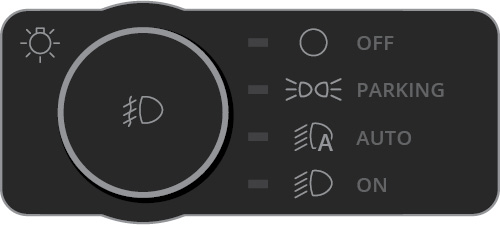
Step 2 — Quickly toggle the headlight dial between OFF and PARK three times, leaving it on PARK the third time.

Step 3 — The DRL will flash three times to confirm programming mode 3. The current configuration will display.

Step 4 — Flash your high beam stalk to cycle through DRL styles. Each option flashes three times before displaying your selection.
Step 5 — When you've reached the desired style, turn the headlight switch off. Wait for all lights to shut off — the configuration will save automatically.
Turn Signal Style Programming (Mode 4)
Step 1 — Turn all lights off, including the off-road switch if applicable.

Step 2 — Quickly toggle the headlight dial between OFF and PARK four times, leaving it on PARK the fourth time.
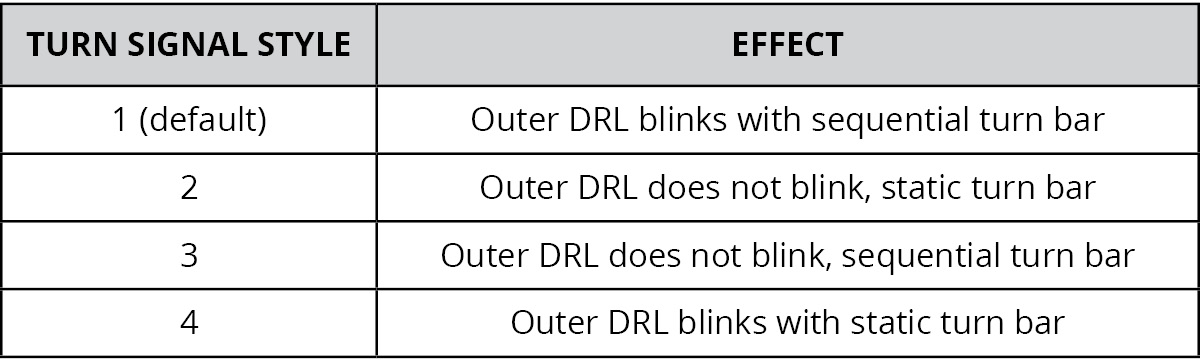
Step 3 — The DRL will flash four times to confirm programming mode 4.
Step 4 — Flash your high beam stalk to cycle through turn signal styles. For styles 2 and 3, the outer DRL dims during the day while the turn signal is active rather than blinking.
Step 5 — When you've reached the desired style, turn the headlight switch off and wait for all lights to shut off.
Welcome Sequence Programming (Mode 5)
Step 1 — Turn all lights off, including the off-road switch if applicable.

Step 2 — Quickly toggle the headlight dial between OFF and PARK five times, leaving it on PARK the fifth time.
Step 3 — The DRL will flash five times to confirm programming mode 5.
Step 4 — Flash your high beam stalk to toggle the welcome sequence on or off (on by default). If set to ON, the sequence runs to confirm. If OFF, the parking lights illuminate without animation.
Step 5 — Turn the headlight switch off and wait for all lights to shut off.
High Beam Boost Programming — Elite Max Only (Mode 6)
The High Beam Boost (HBB) is a supplemental high beam that turns on whenever your high beams are activated. Check local laws before enabling.

Step 1 — Turn all lights off.
Step 2 — Toggle the headlight dial between OFF and PARK six times, leaving it on PARK.
Step 3 — The DRL will flash six times to confirm mode 6.
Step 4 — Flash the high beam stalk to toggle HBB on or off (off by default). The HBB LED pod will turn on or off to show the current setting.
Step 5 — Turn the headlight switch off and wait for all lights to shut off.
Low Beam Assist Programming — Elite Max Only (Mode 7)
Low Beam Assist (LBA) adds width to the low beam pattern. It can be set to on full-time with low beams (default), cornering mode (activates with steering angle on mid/premium trims or with turn signal on base trims), or off.

Step 1 — Turn all lights off.

Step 2 — Toggle the headlight dial between OFF and PARK seven times, leaving it on PARK.
Step 3 — The DRL will flash seven times to confirm mode 7.
Step 4 — Flash the high beam stalk to cycle through LBA settings.
Step 5 — Turn the headlight switch off and wait for all lights to shut off.
Show Mode — Elite Max Only
Step 1 — Turn on the off-road switch.

Step 2 — Toggle the headlight dial between OFF and PARK three times, leaving it on PARK.
Step 3 — Show mode begins with the welcome sequence on a loop.
Step 4 — Flash your high beam stalk to cycle through show mode options.
Step 5 — To exit show mode, turn the off-road switch off.
Factory Reset
Step 1 — Turn all lights off, including the off-road switch if applicable.
Step 2 — Quickly toggle the headlight dial between OFF and PARK fifteen (15) times, leaving it OFF the final time.
Step 3 — The turn signal bars will flash white twice then amber twice to confirm a successful factory reset.
Step 4 — Shut all lights off, then reprogram as desired.
Questions About Programming?
If you run into any issues programming your Elite LED Headlights, contact Ess K Customs — as an authorized Diode Dynamics dealer, we're here to help.
Shop F-150 Lighting at Ess K Customs
Looking for Elite LED Headlights for your 2021-2023 Ford F-150? As an authorized Diode Dynamics dealer, Ess K Customs carries genuine products with full manufacturer warranty.
Browse F-150 Elite LED Headlights at Ess K Customs →
This programming guide applies to Diode Dynamics SKUs: DD5167, DD5168